
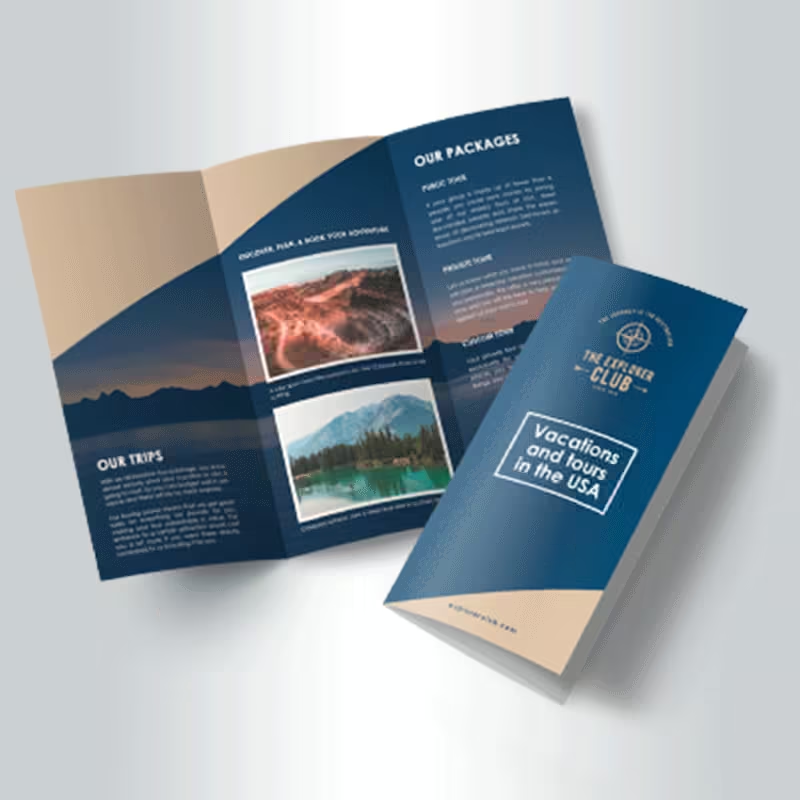
Custom Brochure printing in Tampa for businesses, restaurants, real estate, tourism, healthcare, events, products and direct-mail marketing.
- Full-color custom brochure printing
- Single-sided or double-sided options
- Tri-fold, bi-fold, half-fold and Z-fold configurations
- 100# gloss or silk text stock
- Premium 80#–100# cover stock options
- Gloss, matte, silk, Soft-Touch and available UV-gloss finishes
- Bulk-mail and EDDM® preparation available for qualifying formats
- Versioning and variable-data options available
- Quantities from 250 to 10,000 pieces
- Ideal for services, menus, real estate, tourism, products and events
Brochures
Custom Brochure printing in Tampa for businesses, restaurants, real estate, tourism, healthcare, events, products and direct-mail marketing.
- Full-color custom brochure printing
- Single-sided or double-sided options
- Tri-fold, bi-fold, half-fold and Z-fold configurations
- 100# gloss or silk text stock
- Premium 80#–100# cover stock options
- Gloss, matte, silk, Soft-Touch and available UV-gloss finishes
- Bulk-mail and EDDM® preparation available for qualifying formats
- Versioning and variable-data options available
- Quantities from 250 to 10,000 pieces
- Ideal for services, menus, real estate, tourism, products and events
Custom Brochure Printing in Tampa
Professional Folded Marketing for Services, Products and Promotions
Custom Brochures give businesses more room than a standard flyer to organize services, products, menus, properties, destinations, event information and calls to action into an easy-to-follow folded format.
OneStop Design & Print provides custom brochure printing in Tampa for businesses, restaurants, real estate professionals, hotels, healthcare offices, schools, tourism companies, contractors and organizations.
Choose your fold style, paper stock, printed sides and finish to create a brochure suited to presentations, handouts, sales materials, direct mail or customer information.
Folded Marketing
Organize More Information Without Overcrowding the Page
A well-designed brochure guides readers through information in a planned sequence.
The front panel can introduce your business, service, property or offer. Interior panels can explain benefits, products, packages, pricing, photographs or next steps, while the back panel can hold contact information, business hours, addresses, QR codes or mailing details.
Folds & Finishes
Choose the Brochure Fold That Fits Your Content
Tri-Fold
Classic Multi-Panel Brochure
A popular format for business services, tourism, restaurants, healthcare, real estate and general marketing.
Bi-Fold / Half-Fold
Simple Folded Presentation
Works well for menus, programs, service overviews, presentations and product information.
Z-Fold
Sequential Panel Layout
Useful for maps, schedules, step-by-step content and organized information categories.
Fold availability may depend on the selected finished size, stock, finish, printed sides and production configuration.
Paper Stock Options
Choose Text Weight or Premium Cover Stock
Text Stock
100# Gloss or Silk Text
A traditional brochure weight that folds easily and works well for menus, travel information, service guides, property details and event programs.
Cover Stock
80#–100# Cover Options
A thicker presentation for premium branding, product materials, durable handouts and brochures intended for repeated handling.
Paper availability can vary based on the selected size, fold, finish, printing configuration and quantity.
Printed Sides
Single-Sided or Double-Sided Brochure Printing
Single-Sided
Simple Folded Piece
Use artwork on one side when the reverse is intentionally left blank.
Double-Sided
Use the Full Brochure
Print both the exterior and interior panels for more complete marketing and informational content.
Double-sided printing is recommended for most full marketing brochures because it provides space for a cover, interior content, supporting information and contact details.
Finish Options
Choose the Surface Finish That Matches Your Brand
Gloss
More Visual Impact
Works well with food photography, destinations, products and image-heavy promotional materials.
Matte / Silk
Softer Presentation
A refined lower-glare look for professional services, corporate materials, healthcare and real estate.
Soft-Touch
Premium Feel
Adds a smooth tactile presentation for higher-end marketing pieces and brand materials.
UV gloss may also be available. Finish compatibility depends on paper stock, size, fold configuration, printed sides and quantity.
Business Brochures
Explain Services, Packages and Benefits Clearly
Business brochures can introduce your company, explain services, compare packages, answer common questions and guide potential customers toward a quote, appointment, consultation or purchase.
Use clear headings, short paragraphs, photographs, icons and one obvious call to action instead of filling every panel with dense text.
Restaurants, Hotels & Tourism
Present Menus, Packages, Destinations and Guest Information
Restaurants can use brochures for takeout menus, catering packages, private events and seasonal offerings.
Hotels and tourism businesses can present amenities, attractions, maps, schedules, destination information and guest services in a portable folded format.
Real Estate Brochures
Showcase Properties with Photos, Features and Contact Information
Real estate brochures can include property photography, floor plans, amenities, neighborhood details, development features, agent information and showing instructions.
Use a strong cover image, clear property headline, organized interior panels and a direct call to action such as scheduling a tour or requesting additional information.
Product & Sales Materials
Create Detailed Leave-Behind Marketing Pieces
Brochures are useful for product collections, equipment details, service packages, trade show handouts, sales presentations and customer leave-behind materials.
Versioning can keep the same overall design while changing selected products, locations, representatives, offers or campaign details.
Direct Mail & EDDM®
Prepare Qualifying Brochures for Mailing Campaigns
Bulk-mail and EDDM® preparation may be available for qualifying brochure formats.
Mailing campaigns can support neighborhood outreach, customer lists, local service areas and broader geographic marketing.
The mailing method should be selected before artwork is finalized because the finished size, fold, address area, indicia, barcode, postal clear zones, tabbing and paper stock may affect the layout.
Variable Data Printing
Personalize Brochures for Different Recipients or Markets
Variable-data printing can change approved information from one brochure to another while using the same overall artwork structure.
- Recipient names
- Mailing addresses
- Offer codes
- Location details
- Representative information
- Campaign-specific content
Variable-data files must be accurately organized and matched to the approved artwork template before production.
Bulk Brochure Printing
Quantities from 250 to 10,000
| Quantity | Recommended Use |
|---|---|
| 250 | Local promotions, presentations and limited campaigns |
| 500 | Business outreach, real estate marketing and event distribution |
| 1,000 | Ongoing promotions, tourism, menus and broader campaigns |
| 2,500 | Multi-location distribution, direct mail and recurring marketing |
| 5,000 | Large campaigns, conferences, franchises and regional outreach |
| 10,000 | High-volume mailing, multi-market campaigns and extended distribution |
Specifications
Brochure Printing Specifications
| Specification | Details |
|---|---|
| Product | Custom printed folded brochures |
| Printing | Full-color printing |
| Printed Sides | Single-sided or double-sided |
| Fold Options | Tri-fold, bi-fold, half-fold and Z-fold |
| Text Stock | 100# gloss or 100# silk text |
| Cover Stock | 80# or 100# cover options |
| Finish Options | Gloss, matte, silk, Soft-Touch and UV gloss where available |
| Advanced Options | Versioning and variable-data printing |
| Mailing | Bulk-mail and EDDM® preparation for qualifying formats |
| Quantities | 250–10,000 pieces |
Fold Guide
Common Brochure Fold Styles
| Fold | Recommended Use |
|---|---|
| Bi-Fold / Half-Fold | Menus, programs, presentations, product information and simple service overviews |
| Tri-Fold | Business services, tourism, healthcare, restaurants, real estate and general marketing |
| Z-Fold | Step-by-step content, maps, schedules, separate categories and organized information panels |
Artwork Requirements
Brochure File Setup
| File Requirement | Recommended Setup |
|---|---|
| Preferred Format | Print-ready PDF |
| Simple Flat Artwork | JPEG may be accepted |
| Exterior & Interior | Submit as separate single-page files unless the template specifies otherwise |
| Color Mode | CMYK |
| Resolution | 300 DPI at full finished size recommended |
| Artwork Dimensions | Use the exact template for the selected size and fold |
| Artboard | Do not resize the template or change its proportions |
| Bleed | Extend backgrounds and images through the required bleed area |
| Safety Area | Keep text and essential graphics inside marked safe zones |
| Crop Marks | Do not include unless specifically requested |
| Fonts | Convert all live fonts to outlines |
| Colors | Convert Pantone and spot colors to CMYK unless specialty production is requested |
Interior & Exterior Setup
Prepare the Inside and Outside Panels Correctly
- Clearly label outside and inside artwork files
- Confirm which panel becomes the front cover
- Check the orientation of every panel
- Use the same finished dimensions for both sides
- Do not combine the two sides into an unapproved multi-page layout
Fold Panel Setup
Use the Exact Template for Your Selected Fold
- Do not assume every panel has equal width
- Some tri-fold layouts may require a slightly narrower folding panel
- Keep text, headlines, logos and QR codes away from fold lines
- Allow photos and backgrounds to continue across folds when intended
- Review the complete reading order before submitting artwork
Cover Stock & Scoring
Thicker Brochures May Require Scoring Before Folding
- Keep important content away from score and fold lines
- Avoid extremely thin borders that cross multiple panels
- Allow for minor movement between printing, scoring, trimming and folding
- Use the supplied template for the selected cover stock and fold
Brochure Design Tips
Guide the Reader Through the Panels in a Logical Order
Cover
Use One Strong Headline
Make the main benefit, service, property or offer immediately clear.
Panels
Create a Reading Flow
Arrange information in the same order readers will naturally open the brochure.
Content
Keep It Scannable
Use short paragraphs, headings, photographs and icons instead of dense blocks of copy.
Images
Use High Resolution
Prepare photography at sufficient resolution for the final printed size.
Logo
Use Vector Artwork
Vector logos are preferred whenever available for clean reproduction.
CTA
Make the Next Step Clear
Keep contact information and your primary call to action easy to find.
QR Code Setup
Keep QR Codes Away from Folds and Trim Areas
- Use a high-contrast QR code
- Leave sufficient clear space around the code
- Keep it away from fold lines
- Keep it away from trim lines and page edges
- Test the final QR code before submitting artwork
- Link to an active mobile-friendly destination
Variable-Data Setup
Prepare Campaign Data Carefully Before Production
- Provide a clean spreadsheet with one row per recipient or version
- Use clear column headings for every variable field
- Remove duplicate and incomplete records
- Confirm maximum character lengths for names, addresses and codes
- Approve a variable-data proof before full production
Bulk-Mail Preparation
Plan Mailing Requirements Before Finalizing the Design
- Confirm the mailing method before artwork is finalized
- Reserve required address, barcode, indicia and postal clear zones
- Choose a fold and finished size compatible with the intended mail class
- Allow for tabbing or sealing when required
- Clean and format mailing lists before production
EDDM® Preparation
Prepare Qualifying Brochures for Neighborhood Distribution
- Confirm the selected brochure format qualifies for the intended EDDM® campaign
- Include required postal markings and mailing-panel setup
- Finalize delivery area and quantity before production
- Keep important promotional content outside required postal clear zones
Storage & Handling
Keep Finished Brochures Clean and Ready for Distribution
- Store brochures in a clean, dry indoor location
- Keep printed pieces away from moisture, high heat and direct sunlight
- Do not place heavy objects on unsupported stacks
- Keep coated and Soft-Touch surfaces away from sharp or abrasive objects
- Pack brochures securely before events, distribution or mailing
Tampa Brochure Printing
Custom Brochure Printing in Tampa
OneStop Design & Print provides custom brochure printing for Tampa businesses, restaurants, hotels, real estate professionals, tourism companies, healthcare offices, schools, contractors, events and organizations.
Choose your fold, paper stock, printing configuration and finish for service brochures, menus, property marketing, sales materials, tourism guides or direct-mail campaigns.
Upload print-ready artwork or request design assistance with a qualifying order.
Custom Brochure Printing
Create Professional Folded Marketing for Your Tampa Business
Order custom brochures for services, products, menus, properties, tourism, events, sales presentations or mailing campaigns.
Brochure Printing FAQ
Frequently Asked Questions
What brochure folds are available?
Available configurations include tri-fold, bi-fold, half-fold and Z-fold. Availability may depend on paper stock, finished size, quantity and production requirements.
What is the difference between a tri-fold and Z-fold brochure?
A tri-fold creates a traditional overlapping multi-panel brochure, while a Z-fold opens in an accordion-style sequence that works well for maps, schedules, steps or separate content categories.
Can brochures be printed on both sides?
Yes. Single-sided and double-sided full-color printing are available. Double-sided printing is recommended when both the exterior and interior panels contain content.
Which paper stocks are available?
Options include 100# gloss or silk text stock and premium 80#–100# cover stocks. Availability may vary by fold, finish and quantity.
Which brochure finishes are available?
Finish options may include gloss, matte, silk, Soft-Touch and UV gloss. Available combinations depend on the selected paper, fold, printed sides and quantity.
What brochure quantities can I order?
Current brochure quantities range from 250 to 10,000 pieces, supporting local promotions, business distribution, direct-mail campaigns and higher-volume marketing.
Can you print different versions of the same brochure?
Yes. Versioning can change locations, products, offers, representatives or other selected information while retaining the same general brochure design.
Is variable-data brochure printing available?
Yes. Approved variable fields may include names, addresses, offer codes, locations or other campaign data. A properly prepared data file is required.
Can brochures be prepared for bulk mail?
Yes. Bulk-mail preparation may be available for qualifying brochure sizes and configurations. Mailing requirements should be determined before artwork is finalized.
Can brochures be prepared for EDDM®?
Yes. EDDM® preparation may be available for qualifying formats. The selected size, fold, postal markings, mailing panel and delivery requirements must be confirmed before production.
What artwork file is best for brochure printing?
A print-ready PDF is preferred. The exterior and interior should normally be supplied as separate single-page files using the exact template for the selected size and fold.
What resolution should brochure artwork use?
300 DPI at the full finished size is recommended for raster artwork.
Do you offer custom brochure printing in Tampa?
Yes. OneStop Design & Print provides custom brochure printing for Tampa businesses, restaurants, hotels, real estate professionals, tourism companies, healthcare offices, schools, events and organizations.
Customer Reviews
Share your experience—leave a review.
 Posted on Google
 Mahmoud Atwa
 The team there is so professional and they were kind enough to answer all my questions on the phone!Posted on Google
 Benjamin BurkhalterAwesome place , the guy that helped me was tremendously nice and respectful and helpful. They are fast and professional and want to win your business, I definitely look forward to working with them again, they seem to have a great variety of things they can help you with and don’t nickel and dime you, give them a go!!Posted on Google
 Matt G**Review for One Stop Signage Company** I recently had the pleasure of working with One Stop Signage Company for a project that required custom signage for my business, and I cannot recommend them highly enough! From start to finish, the entire experience was seamless, professional, and exceeded my expectations. **Quality of Work:** The quality of the signage they produced is outstanding. The materials used are durable, and the printing is vibrant and precise. The attention to detail is evident in every aspect of their work, from the design to the final installation. The signs look incredibly professional and have already garnered compliments from customers. **Customer Service:** The team at One Stop Signage is truly exceptional. They were incredibly responsive, patient, and attentive to my needs. They took the time to understand my vision and provided expert guidance to ensure the final product was perfect. Their communication throughout the process was clear and timely, which made the entire experience stress-free. **Design Expertise:** Their design team is incredibly talented. They took my initial ideas and transformed them into a stunning, cohesive design that perfectly represents my brand. They were open to revisions and made sure I was 100% satisfied before moving forward with production. **Timeliness:** One Stop Signage delivered the project on time, which was crucial for my business launch. They managed to meet a tight deadline without compromising on quality, which I truly appreciated. **Value for Money:** Considering the high-quality materials, craftsmanship, and excellent service, the pricing is very reasonable. They offer great value for the level of expertise and professionalism they provide. **Overall Experience:** Working with One Stop Signage Company was an absolute pleasure. They are a reliable, creative, and customer-focused business that delivers top-notch results. If you’re looking for a signage company that combines quality, professionalism, and outstanding service, look no further. I will definitely be using them for all my future signage needs! **Rating:** ⭐⭐⭐⭐⭐ (5/5) Thank you, One Stop Signage, for helping my business stand out with your incredible work!Posted on Google
 Adham ElbazGreat service and quality finishes. The signs came out even better than we expected and the material was impeccable. Can’t recommend enough
Owner's reply
Thank you so much for your amazing feedback! We're thrilled to hear that you loved the service, quality, and signs. It's wonderful to know that everything exceeded your expectations. We look forward to working with you again in the future!Posted on Google Custom Corner"Excellent quality, quick delivery, and unmatched prices!"
Owner's reply
Thank you so much for your fantastic review! We're thrilled to hear that you are pleased with our quality, delivery speed, and pricing. We look forward to serving you again soon.Posted on Google Mohamed Eldeifi❤️❤️❤️
Owner's reply
Thank you so much for the love and support! We're thrilled to know you had a great experience with us. We look forward to serving you again in the future!Posted on Google Амир АрифовI was looking for the good Print company and hopefully I found it. These guys made me a banner with good quality for the lower price
Owner's reply
Thank you so much for your positive feedback! We're delighted to hear that you're satisfied with the banner's quality and price. It's our goal to provide excellent service, and we're thrilled to have met your expectations. We look forward to serving you again!Posted on Google Omar AboseadaVery professional and very good quality highly recommended
Owner's reply
Thank you for your kind words and recommendation! We are thrilled to hear that you are satisfied with our services and quality. We look forward to serving you again in the future.Posted on Google Mahmoud AfifiI’ve been doing business with Onestop since their days in Wisconsin, and they’ve always been my go-to for printing needs. When they moved to Florida, I tried working with 2-3 other printing companies, but none of them came close to Onestop’s quality and service. On top of that, the alternatives were even more expensive! I decided to give Onestop a call, and I’m so glad I did. They told me they could ship anything I needed directly to me, even though they’re now based in Tampa. That was the best news ever! The quality of their work is unmatched, and their customer service is just as fantastic as I remember. It feels great to know I can still count on Onestop no matter where they are. Highly recommended!
Owner's reply
Thank you for your kind words and continued support! We're thrilled to hear that our quality and service continue to meet your expectations, even from afar. Shipping directly to you is just one of the ways we strive to make sure your experience with us is hassle-free and convenient. Your recommendation means a lot to us, and we look forward to assisting you with future printing needs. Thanks again!
Onestop Design & Print
- 2437 S 86th St E, Tampa, FL 33619
- (813) 400‑3327
- sales@onestopdp.com
- Opening Hours: 10:00am - 5:00pm
- 2437 S 86th St E, Tampa, FL 33619
- (813) 400‑3327
- sales@onestopdp.com
- Opening Hours: 10:00am - 5:00pm