
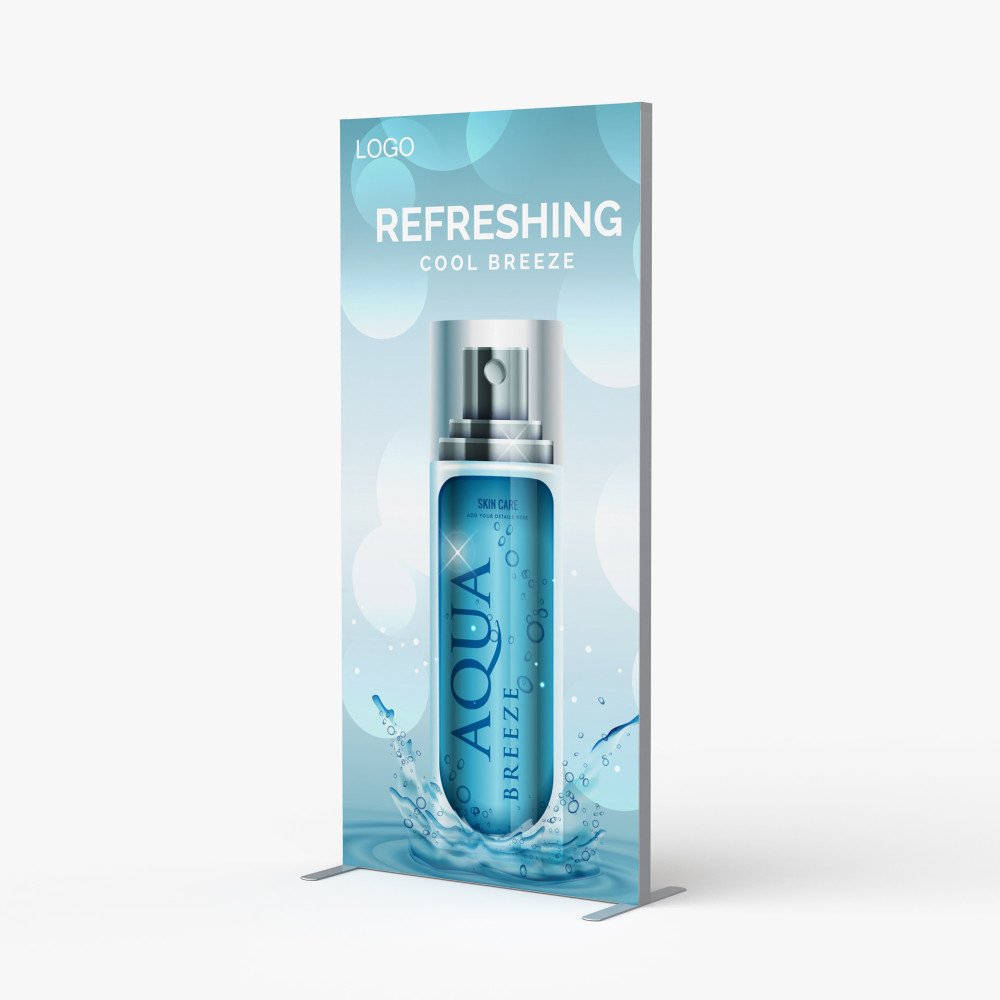
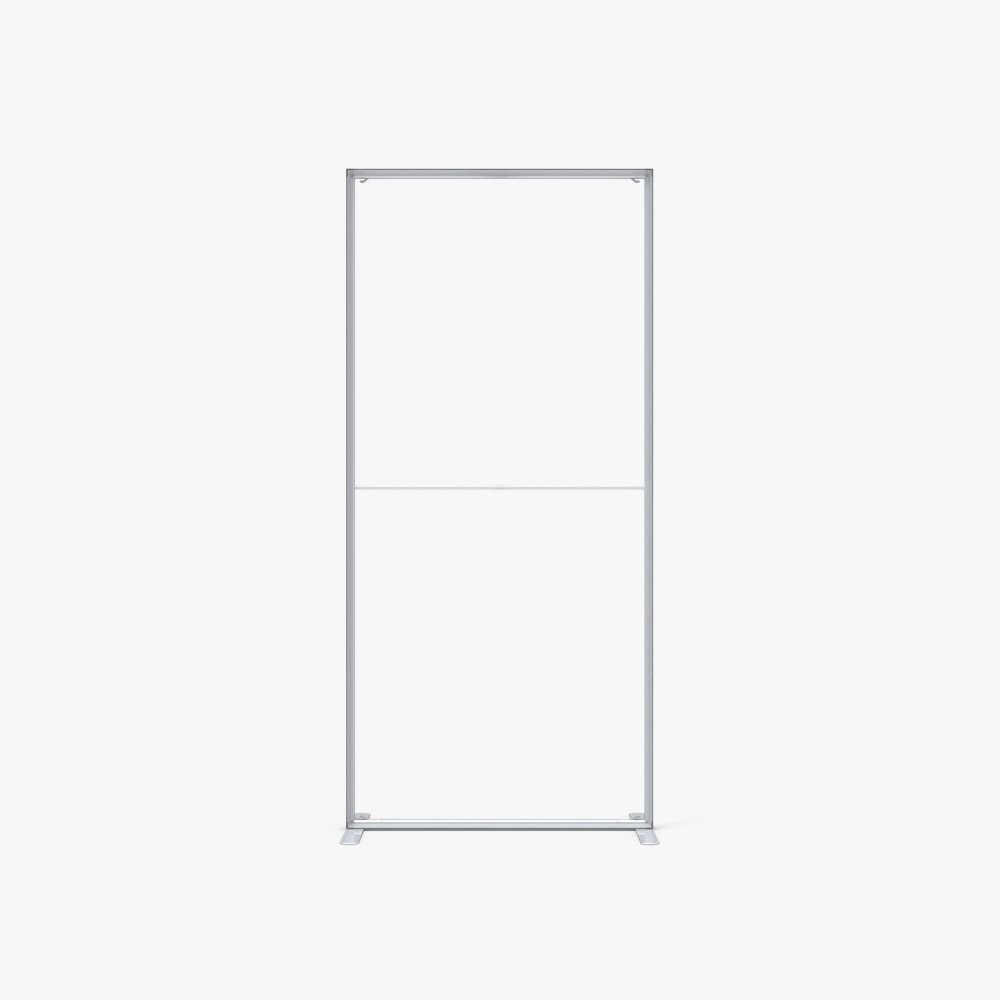
Custom 3ft SEG Fabric Stand printing in Tampa for trade shows, retail displays, conferences, registration areas, showrooms, events and professional branded spaces.
- Compact 33.45″ × 78.75″ floor display
- Full-color UV printing on premium 6 oz fabric
- Silicone edge installs neatly into the aluminum frame channel
- Quick-assembly reusable aluminum hardware
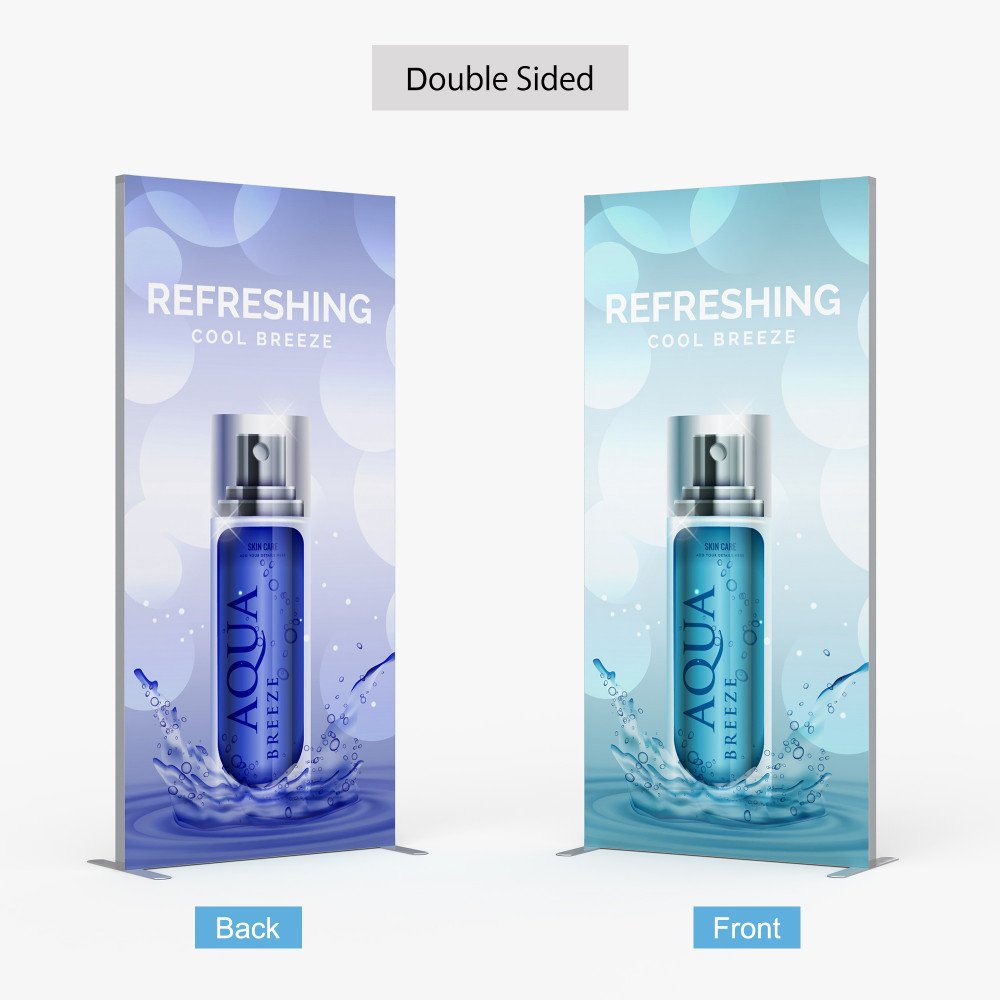
- Single-sided or double-sided printing available
- Replaceable graphics for future promotions
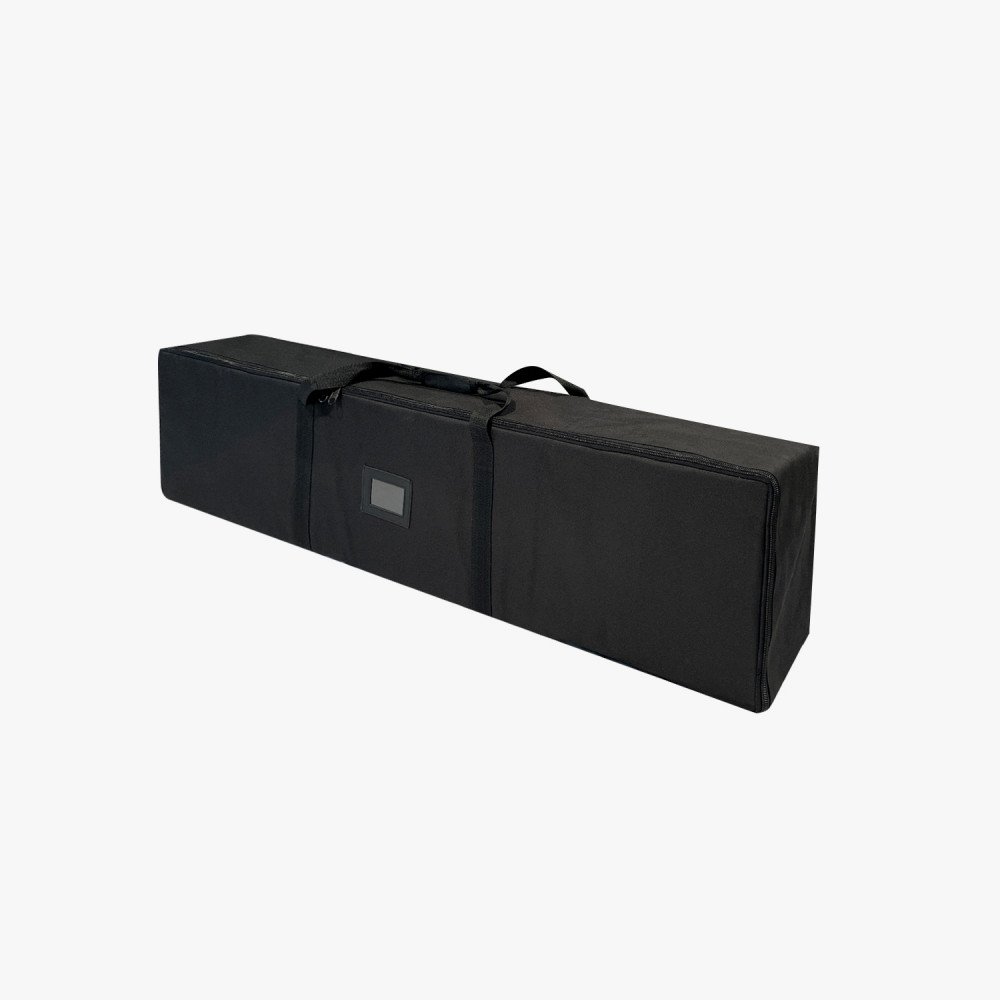
- Complimentary travel and storage bag included
- Designed primarily for indoor and protected environments
3ft SEG Fabric Stand
Custom 3ft SEG Fabric Stand printing in Tampa for trade shows, retail displays, conferences, registration areas, showrooms, events and professional branded spaces.
- Compact 33.45″ × 78.75″ floor display
- Full-color UV printing on premium 6 oz fabric
- Silicone edge installs neatly into the aluminum frame channel
- Quick-assembly reusable aluminum hardware
- Single-sided or double-sided printing available
- Replaceable graphics for future promotions
- Complimentary travel and storage bag included
- Designed primarily for indoor and protected environments
3ft SEG Fabric Stand Printing in Tampa
Compact Professional Displays for Trade Shows, Retail and Events
The 3ft SEG Fabric Stand creates a polished vertical display without requiring the floor space of a large exhibit wall, making it a practical choice for trade shows, retail environments, conference registration areas, showrooms and professional events.
OneStop Design & Print provides custom 3ft SEG Fabric Stands for Tampa businesses, trade show exhibitors, retailers, hotels, schools, event planners and corporate teams.
The tall, narrow format works well for booth entrances, directional graphics, product highlights, service promotions, sponsor messaging and modular event layouts.
Silicone Edge Graphic
What Is an SEG Fabric Stand?
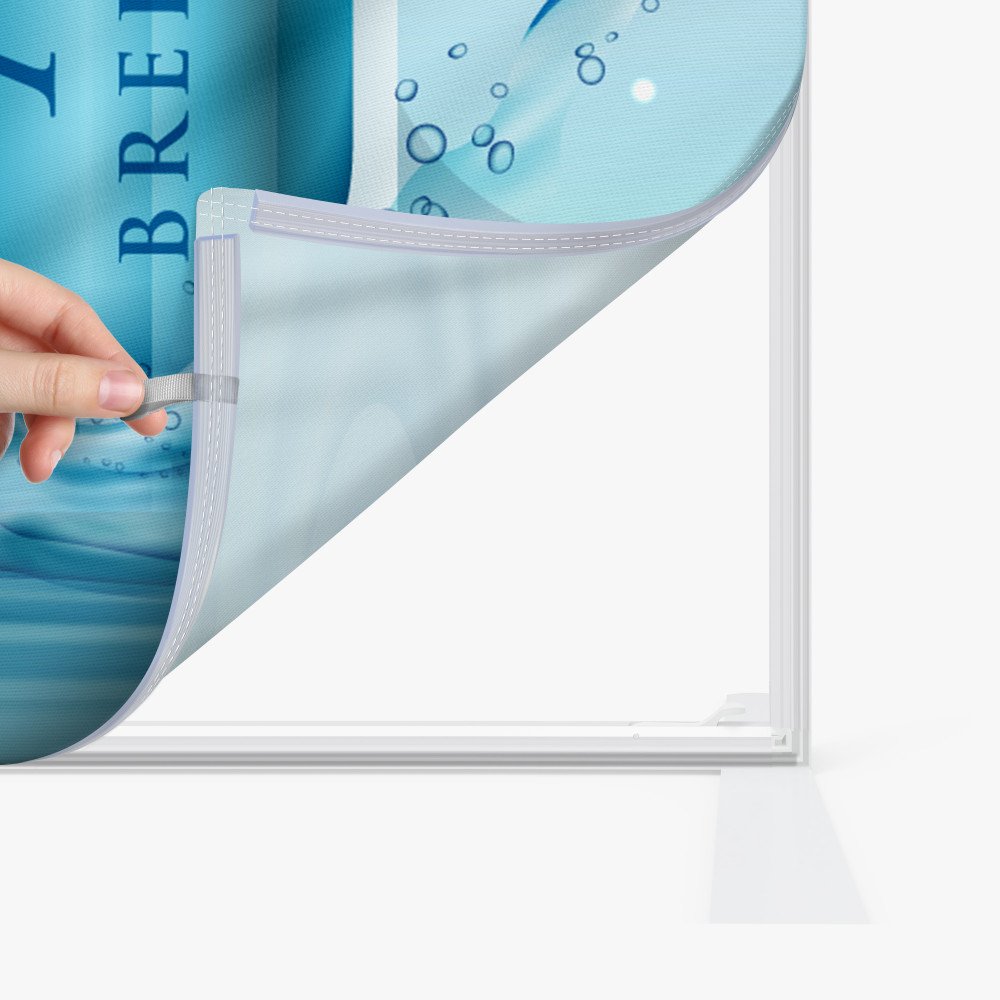
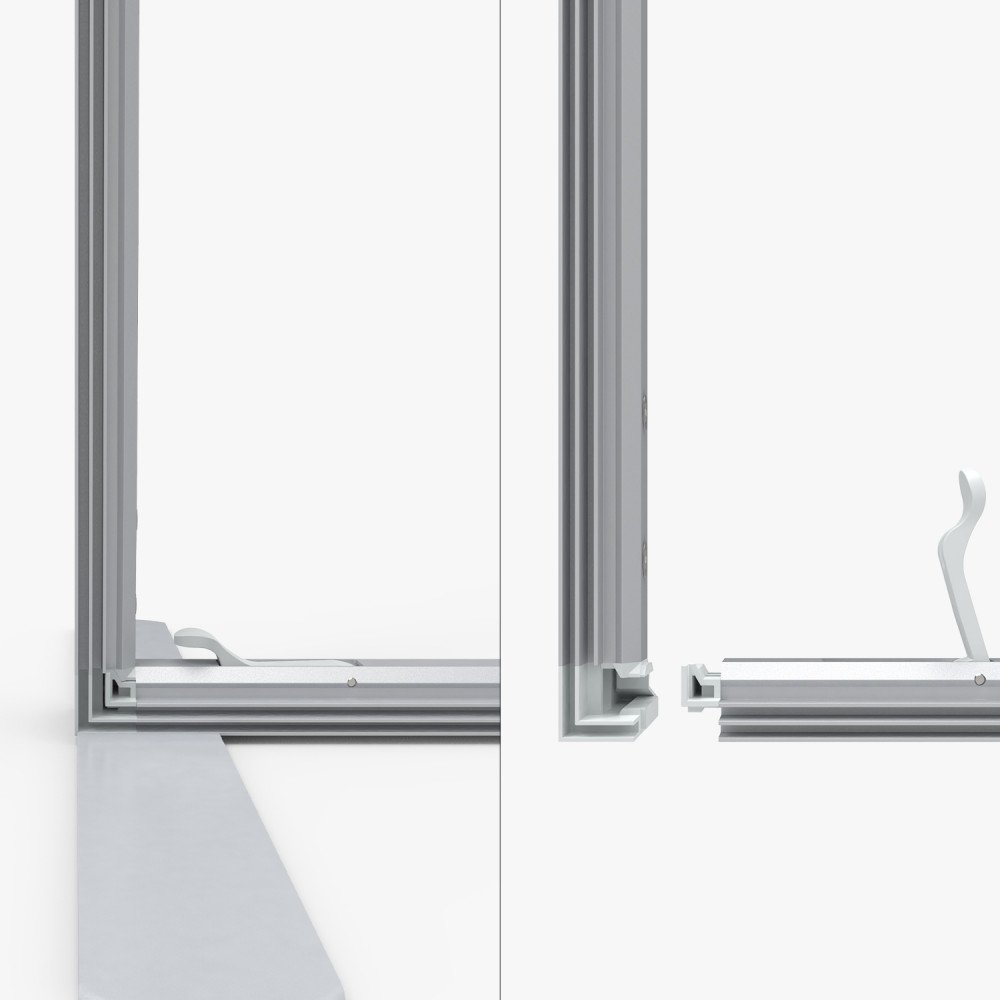
SEG stands for Silicone Edge Graphic. A flexible silicone strip is sewn around the perimeter of the fabric and inserted into a narrow channel inside the aluminum frame.
Once installed correctly, the silicone edge pulls the graphic evenly across the hardware to create a smooth, fitted appearance.
The printed fabric edges remain concealed inside the frame, eliminating visible front-facing grommets, clips, pole pockets and loose fabric.
Display Features
Full-Color UV Printing on Premium 6 oz Fabric
The graphic is printed on premium 6 oz fabric using high-resolution full-color UV printing.
The material supports detailed logos, photography, product graphics, gradients, service information, QR codes and branded promotional artwork.
Premium 6 oz Material
Printed fabric designed for a smooth SEG presentation inside the reusable frame.
Full-Color UV
High-resolution printing supports detailed logos, images, gradients and promotional artwork.
Concealed Edges
The silicone perimeter sits inside the frame channel for a clean professional presentation.
Single or Double Sided
Choose the Best Display Configuration for Your Space
Against Walls or Booth Structures
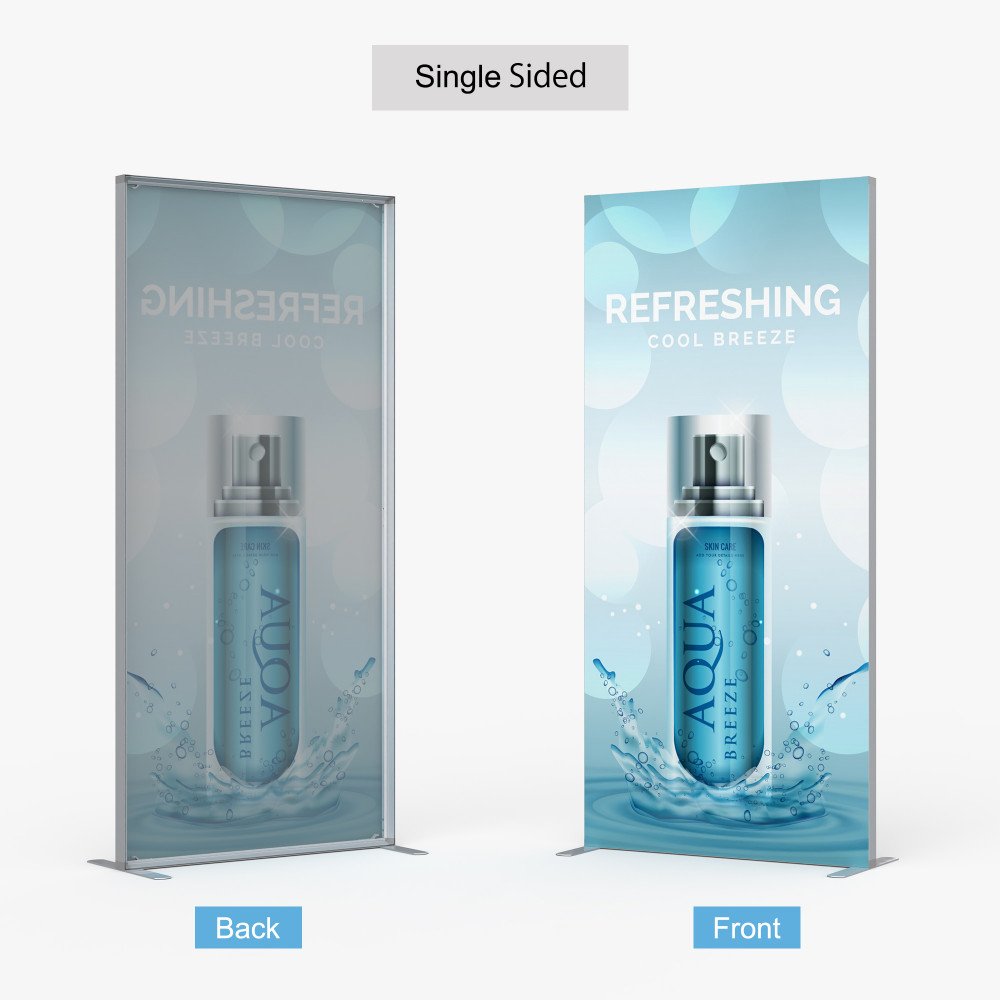
Choose one printed graphic when the stand will sit against a booth wall, lobby wall, retail fixture or exhibit backdrop.
Two-Way Visibility
Choose graphics on both sides when visitors approach from multiple directions in open aisles, entrances, showrooms or registration areas.
Double-sided orders require separate artwork files for the front and back. You may use the same design on both sides or promote different products, services, sponsors or messages.
Reusable Aluminum Hardware
Quick-Assembly Frame for Repeated Use
The reusable aluminum frame is lightweight, portable and designed for efficient assembly.
The stand uses an 18-inch-deep floor footprint while keeping the printed graphic relatively narrow, helping conserve booth, retail and event floor space.
Frame sections connect to create the complete structure, and the SEG fabric presses directly into the surrounding perimeter channel.
Modular Exhibit Display
Use One Stand or Combine Several Displays
A single 3ft SEG Fabric Stand can highlight one message, product or direction point, while several stands can be positioned throughout an event space for coordinated branding.
- Booth entrance graphics
- Product highlights
- Service displays
- Sponsor recognition
- Directional messaging
- Registration areas
- Exhibit partitions
- Branded event pathways
Replaceable Graphics
Update the Artwork Without Replacing the Frame
The printed graphic can be removed from the frame and replaced with a compatible SEG print when products, services, sponsors, branding or promotional messaging change.
Replacement graphics must match the exact frame dimensions and silicone-edge specifications. Use the supplied product template for future graphics so the replacement fits the existing hardware correctly.
Recommended Applications
Professional Vertical Displays for Events and Business Spaces
- Trade show booth entrances
- Retail and showroom promotions
- Conference registration areas
- Hotel and venue signage
- Product displays
- Service promotions
- Corporate presentations
- Directional signage
- Informational displays
- Sponsor recognition
- Modular exhibit partitions
- Branded event pathways
Specifications
3ft SEG Fabric Stand Specifications
| Specification | Details |
|---|---|
| Product Type | Freestanding SEG fabric display |
| Display Size | 33.45″W × 78.75″H × 18″D |
| Graphic Material | Premium 6 oz fabric |
| Printing | Full-color high-resolution UV printing |
| Graphic Construction | Silicone strip sewn around the perimeter |
| Graphic Finish | Smooth presentation with concealed edges |
| Print Options | Single-sided or double-sided |
| Hardware | Quick-assembly reusable aluminum frame |
| Display Depth | 18 inches |
| Display Weight | 13 lbs |
| Package Size | 43″W × 8.25″H × 2.75″D |
| Included Accessory | Complimentary travel and storage bag |
| Primary Environment | Indoor and protected display environments |
Size & Transport
Compact 33.45″ × 78.75″ Floor Display
| Display Size | Graphic Size | Weight | Package Size |
|---|---|---|---|
| 33.45″W × 78.75″H × 18″D | Use supplied template | 13 lbs | 43″W × 8.25″H × 2.75″D |
The compact hardware disassembles into smaller frame sections and includes a travel bag for easier transportation and storage between events.
Travel & Storage Bag
Complimentary Bag Included
A complimentary travel and storage bag is included with the stand.
Use the bag to keep the aluminum frame sections, connectors and related hardware organized during transport and between events.
- Helps organize frame sections
- Convenient for event transportation
- Useful for storing hardware between campaigns
- Helps keep small components together
Display Environment
Designed Primarily for Indoor and Protected Use
Place the assembled stand on a clean, flat and level indoor surface and confirm that all frame sections, connectors and graphics are properly secured before use.
- Use on a stable, level surface
- Keep away from strong airflow
- Avoid unstable flooring
- Keep away from exposed exterior doors
- Avoid crowded walkways where the stand could be bumped
- Do not use in unprotected outdoor locations
Artwork Requirements
3ft SEG Fabric Stand File Setup
| File Requirement | Recommended Setup |
|---|---|
| Accepted Formats | PDF or JPEG |
| PDF Setup | Submit a single-page PDF for each printed side |
| Color Mode | CMYK |
| Resolution | 150 DPI at full finished size |
| Maximum Upload | 300 MB |
| Artwork Dimensions | Use the supplied template for the selected configuration |
| Artboard | Do not resize the artboard or alter template proportions |
| Bleed | Follow the bleed areas shown in the supplied template |
| Crop Marks | Do not include unless specifically requested |
| Fonts | Convert all live fonts to outlines |
| Colors | Convert Pantone and spot colors to CMYK |
SEG Template Setup
Use the Supplied Template Without Changing Its Structure
- Do not adjust the artboard size
- Do not reposition required guidelines
- Do not resize required template elements
- Place final artwork on the layer labeled Artwork
- Delete mask or guide layers only when instructed
- Keep the original document orientation unchanged
- Review perimeter, corner, bleed and safety areas before export
Double-Sided Artwork
Submit Separate Front and Back Graphics
- Upload the front graphic as a separate file
- Upload the back graphic as a separate file
- Clearly label both artwork files
- Use the correct template for each printed side
- Keep both designs at matching dimensions and orientation
- Confirm which message faces each direction after assembly
- Do not combine both designs into a multi-page PDF unless specifically requested
SEG Artwork Safety
Keep Important Content Away from the Silicone Perimeter
- Keep logos inside the template safety area
- Keep important text away from outer edges
- Keep faces and QR codes away from the silicone-edge perimeter
- Allow for slight fabric tension around corners and frame channels
- Avoid thin borders requiring exact edge alignment
- Use the supplied template to confirm the complete visible graphic area
Vertical Display Design Tips
Design for a Tall, Narrow Graphic Area
Keep Branding High
Place the primary logo or headline near the upper portion of the graphic.
Keep It Focused
Use one clear primary message that visitors can understand quickly.
Prioritize Key Benefits
Position important services, benefits or product information near eye level.
Improve Readability
Maintain strong contrast between important typography and the background.
Use High Resolution
Use high-quality photography and vector logos for professional reproduction.
One Clear Action
Keep one clear call to action visible without overcrowding the narrow layout.
QR Code Setup
Make QR Codes Easy to Scan
- Use a high-contrast QR code
- Leave clear space around every side
- Keep the code inside the template safety area
- Keep it away from the silicone perimeter
- Make it large enough to scan comfortably
- Test the final code before submitting artwork
- Link to an active mobile-friendly destination
Color & Production
Prepare Artwork for UV-Printed Fabric
- Convert final artwork to CMYK before uploading
- Monitor colors may differ from the finished UV-printed fabric
- Convert Pantone and spot colors to CMYK
- Fabric texture may slightly affect very fine details
- Fabric tension may slightly affect detailed graphic elements
- Single- and double-sided configurations may appear different under strong surrounding light
Installation
How to Assemble a 3ft SEG Fabric Stand
- Organize the components: Remove the aluminum frame sections and connectors from the travel bag and place them on a clean surface.
- Assemble the frame: Connect the aluminum sections according to the supplied installation guide until the structure is secure.
- Position the stand: Place the assembled hardware upright on a clean, flat and level indoor surface.
- Align the graphic: Insert the silicone edge into the frame channel at each corner first.
- Install the remaining edges: Work from the corners toward the center of each side, pressing the silicone strip evenly into the channel.
- Add the second graphic: For double-sided displays, repeat the process on the opposite side using the correctly labeled artwork.
- Inspect the display: Confirm that the graphic is smooth, all silicone edges are fully seated and the frame is stable.
Care & Storage
Protect the Fabric Graphic and Reusable Hardware
- Assemble the stand on a clean, stable surface
- Install the silicone edge gradually without forcing it
- Keep the fabric graphic clean and dry
- Keep printed fabric away from sharp objects
- Remove the graphic carefully before disassembling the frame
- Store the hardware, connectors and graphic with care
- Use the included travel bag for transportation and storage
- Keep the display in a clean, dry indoor environment when not in use
Tampa SEG Stand Printing
3ft SEG Fabric Stands in Tampa
OneStop Design & Print provides custom 3ft SEG Fabric Stands for Tampa businesses, trade show exhibitors, retailers, hotels, conferences, schools, venues, event planners and corporate teams.
Choose single-sided or double-sided graphics and create a portable professional display using premium UV-printed fabric and reusable aluminum hardware.
Upload print-ready artwork or request free custom design assistance with a qualifying order.
Related Trade Show Displays
Build a Complete Event Display Setup
10ft SEG Fabric Display
Choose a wider SEG wall when you need a large trade show backdrop or branded booth background.
20ft SEG Fabric Display
Choose the extra-large 20ft SEG display for expansive booths, large presentations and high-impact event branding.
Tension Fabric Stand
Compare another portable fabric display option for trade shows, presentations and retail environments.
Create a Portable Professional Display for Your Tampa Brand
Order a custom 3ft SEG stand with UV-printed fabric graphics, reusable aluminum hardware, single- or double-sided options and an included travel bag.
Frequently Asked Questions
What does SEG mean?
SEG means Silicone Edge Graphic. A flexible silicone strip is sewn around the fabric perimeter and inserted into a channel in the aluminum frame to create a smooth display with concealed edges.
What size is the 3ft SEG Fabric Stand?
The assembled stand measures 33.45″ wide × 78.75″ high × 18″ deep.
How much does the 3ft SEG Fabric Stand weigh?
The listed display weight is approximately 13 lbs.
What material is the graphic printed on?
The graphic uses premium 6 oz fabric with full-color UV printing and a silicone strip sewn around the perimeter.
Can the 3ft SEG Fabric Stand be printed on both sides?
Yes. Single-sided and double-sided configurations are available. Double-sided orders require separate artwork files for the front and back.
Can the front and back use different designs?
Yes. You may use the same graphic on both sides or submit separate designs for different products, services, sponsors or messages.
Can I order replacement graphics without buying another frame?
Yes. The reusable aluminum frame accepts compatible replacement SEG graphics that match the frame dimensions, supplied template and silicone-edge specifications.
Does the 3ft SEG Fabric Stand include a travel bag?
Yes. A complimentary travel and storage bag is included for transporting and organizing the display hardware.
What is the package size?
The listed package size is 43″ wide × 8.25″ high × 2.75″ deep.
Is the 3ft SEG Fabric Stand suitable for outdoor use?
This stand is designed primarily for indoor and protected environments. Keep it away from strong airflow, exterior doors, unstable flooring and unprotected outdoor locations.
What artwork resolution should I use?
Artwork should be prepared at 150 DPI at full finished size using the supplied SEG template.
What file formats are accepted?
PDF and JPEG files are accepted. Submit a single-page PDF for each printed side when using PDF artwork.
Do you offer 3ft SEG Fabric Stand printing in Tampa?
Yes. OneStop Design & Print provides custom 3ft SEG Fabric Stands for Tampa businesses, trade shows, retailers, hotels, conferences, schools and events.
Customer Reviews
Share your experience—leave a review.
 Posted on Google
 Mahmoud Atwa
 The team there is so professional and they were kind enough to answer all my questions on the phone!Posted on Google
 Benjamin BurkhalterAwesome place , the guy that helped me was tremendously nice and respectful and helpful. They are fast and professional and want to win your business, I definitely look forward to working with them again, they seem to have a great variety of things they can help you with and don’t nickel and dime you, give them a go!!Posted on Google
 Matt G**Review for One Stop Signage Company** I recently had the pleasure of working with One Stop Signage Company for a project that required custom signage for my business, and I cannot recommend them highly enough! From start to finish, the entire experience was seamless, professional, and exceeded my expectations. **Quality of Work:** The quality of the signage they produced is outstanding. The materials used are durable, and the printing is vibrant and precise. The attention to detail is evident in every aspect of their work, from the design to the final installation. The signs look incredibly professional and have already garnered compliments from customers. **Customer Service:** The team at One Stop Signage is truly exceptional. They were incredibly responsive, patient, and attentive to my needs. They took the time to understand my vision and provided expert guidance to ensure the final product was perfect. Their communication throughout the process was clear and timely, which made the entire experience stress-free. **Design Expertise:** Their design team is incredibly talented. They took my initial ideas and transformed them into a stunning, cohesive design that perfectly represents my brand. They were open to revisions and made sure I was 100% satisfied before moving forward with production. **Timeliness:** One Stop Signage delivered the project on time, which was crucial for my business launch. They managed to meet a tight deadline without compromising on quality, which I truly appreciated. **Value for Money:** Considering the high-quality materials, craftsmanship, and excellent service, the pricing is very reasonable. They offer great value for the level of expertise and professionalism they provide. **Overall Experience:** Working with One Stop Signage Company was an absolute pleasure. They are a reliable, creative, and customer-focused business that delivers top-notch results. If you’re looking for a signage company that combines quality, professionalism, and outstanding service, look no further. I will definitely be using them for all my future signage needs! **Rating:** ⭐⭐⭐⭐⭐ (5/5) Thank you, One Stop Signage, for helping my business stand out with your incredible work!Posted on Google
 Adham ElbazGreat service and quality finishes. The signs came out even better than we expected and the material was impeccable. Can’t recommend enough
Owner's reply
Thank you so much for your amazing feedback! We're thrilled to hear that you loved the service, quality, and signs. It's wonderful to know that everything exceeded your expectations. We look forward to working with you again in the future!Posted on Google Custom Corner"Excellent quality, quick delivery, and unmatched prices!"
Owner's reply
Thank you so much for your fantastic review! We're thrilled to hear that you are pleased with our quality, delivery speed, and pricing. We look forward to serving you again soon.Posted on Google Mohamed Eldeifi❤️❤️❤️
Owner's reply
Thank you so much for the love and support! We're thrilled to know you had a great experience with us. We look forward to serving you again in the future!Posted on Google Амир АрифовI was looking for the good Print company and hopefully I found it. These guys made me a banner with good quality for the lower price
Owner's reply
Thank you so much for your positive feedback! We're delighted to hear that you're satisfied with the banner's quality and price. It's our goal to provide excellent service, and we're thrilled to have met your expectations. We look forward to serving you again!Posted on Google Omar AboseadaVery professional and very good quality highly recommended
Owner's reply
Thank you for your kind words and recommendation! We are thrilled to hear that you are satisfied with our services and quality. We look forward to serving you again in the future.Posted on Google Mahmoud AfifiI’ve been doing business with Onestop since their days in Wisconsin, and they’ve always been my go-to for printing needs. When they moved to Florida, I tried working with 2-3 other printing companies, but none of them came close to Onestop’s quality and service. On top of that, the alternatives were even more expensive! I decided to give Onestop a call, and I’m so glad I did. They told me they could ship anything I needed directly to me, even though they’re now based in Tampa. That was the best news ever! The quality of their work is unmatched, and their customer service is just as fantastic as I remember. It feels great to know I can still count on Onestop no matter where they are. Highly recommended!
Owner's reply
Thank you for your kind words and continued support! We're thrilled to hear that our quality and service continue to meet your expectations, even from afar. Shipping directly to you is just one of the ways we strive to make sure your experience with us is hassle-free and convenient. Your recommendation means a lot to us, and we look forward to assisting you with future printing needs. Thanks again!
Onestop Design & Print
- 2437 S 86th St E, Tampa, FL 33619
- (813) 400‑3327
- sales@onestopdp.com
- Opening Hours: 10:00am - 5:00pm
- 2437 S 86th St E, Tampa, FL 33619
- (813) 400‑3327
- sales@onestopdp.com
- Opening Hours: 10:00am - 5:00pm